Paul Sutton

Personal Blog

I joined Mastodon social network last year. I am now reposting this guide to signing up and getting started.

Firstly you need to go to join mastodon where you will be presented with the following:-

mastodon1

Clicking on Get Started actually takes further down the page to:-

mastodon2

Where you can select from one of the many instances available, your choice may be influenced by:-

  • Geographical location
  • Interests
  • Number of users on a particular instance

Or some other reason.

I decided to go for quto.org as this is a STEM related instance. So clicking on the signup link.

signupscr

Filled in the credentials. After which I am asked to confirm. You will be asked to agree to some terms and conditions too.

confirm

Once confirmed you are taken to a set of 3 intro pages:

confirm

confirm

confirm

Then you are presented with

confirm

Where you can now set up your profile etc.

— Finding people to follow.

Enter their fediverse id in to the search box.

search

Usually this takes the form of

@username@instancename

You can follow me on the above qoto.org server by clicking this link.

In order for you to see items from my blog in your feed you need to take the following step in your profile settings.

Which is pretty easy to do, clearly this gives you a lot of control over what is then fed in to your feed.

Conclusion

Very easy sign up process, which is great, it looks like this instance also supports inline $\LaTeX$ which is cool too. I have now subscribed to this blog from mastodon.

Not quite ready to #deletetwitter yet, I have some contacts. Compared to the sign-up process on more old fashioned social media this is a breeze.

tags

#social,#network,#fediverse,#mastodon,#freedom,#privacy,#federation,#deletefacebook,#deletetwitter

You can find me on Friendica at zleap@social.isurf.ca


cc-by logo

Licenced under Attribution 4.0 International (CC BY 4.0)


Mastodon ShellLabs Join Mastodon
AI statement : Consent is NOT granted to use the content of this blog for the purposes of AI training or similar activity. Consent CANNOT be assumed, it has to be granted.

Donate using Liberapay

0AD Screenshots

So following on from the recent mini games conference talk on 0ad. The video for the talk is below

0ad talk

I am including below a few screenshots from the game.

Opening Screen Opening Screen Main building Main Building, to build units Roman Warship Roman warship

#Games,#0ad,#screenshots,#minidebconf,#video


Mastodon ShellLabs Join Mastodon
AI statement : Consent is NOT granted to use the content of this blog for the purposes of AI training or similar activity. Consent CANNOT be assumed, it has to be granted.

Donate using Liberapay

Torbay Covid 19 restrictions 28/11/2020

From Thursday 5 November until 00.00 Wednesday 2 December, you must:

  • stay at home, except for specific purposes
  • avoid meeting people you do not live with, except for specific purposes
  • close certain businesses and venues.

From December 2nd Torbay is in Tier 2.

#covid,#health,#advice


Mastodon ShellLabs Join Mastodon
AI statement : Consent is NOT granted to use the content of this blog for the purposes of AI training or similar activity. Consent CANNOT be assumed, it has to be granted.

Donate using Liberapay

EmacsConf 2020

Emacs conference 28th & 29th November 2020

https://emacsconf.org/


Mastodon ShellLabs Join Mastodon
AI statement : Consent is NOT granted to use the content of this blog for the purposes of AI training or similar activity. Consent CANNOT be assumed, it has to be granted.

Donate using Liberapay

Open Terminal here

If, like me you find yourself dropping to the terminal to, perhaps say git push files to gitlab. You need to keep navigating to the directory where the files you want to push are located.

XFCE4'S Thunar file manager has a short cut to this. Right *click**, select Open Terminal Here and you drop to that directory in the terminal.

Open Terminal Here

Video below for illustration.


Mastodon ShellLabs Join Mastodon
AI statement : Consent is NOT granted to use the content of this blog for the purposes of AI training or similar activity. Consent CANNOT be assumed, it has to be granted.

Donate using Liberapay

COVID 19 TIER ALERT LEVEL

The UK government has announced restrictions and alert levels each area will go in to after coming out of the national lock down on December 2nd. These depend on the regional cases and alert levels.

It looks like Torbay is in

Please also see

  • Torbay page for local updates and restrictions.

#UK,#Torbay,#covid19,#alert,#level,#restrictions,


Mastodon ShellLabs Join Mastodon
AI statement : Consent is NOT granted to use the content of this blog for the purposes of AI training or similar activity. Consent CANNOT be assumed, it has to be granted.

Donate using Liberapay

GIMP – Modify image with the Fill tool.

As part of creating How_to's for Libreoffice, I had to modify an existing graphic of a keyboard, to highlight the shortcut keys for different functions (e.g printing).

This formed part of my Keyboard Shortcuts how_to.

In order to do this, I used GIMP

Starting with the original image.

keyboard original

I opened this in GIMP

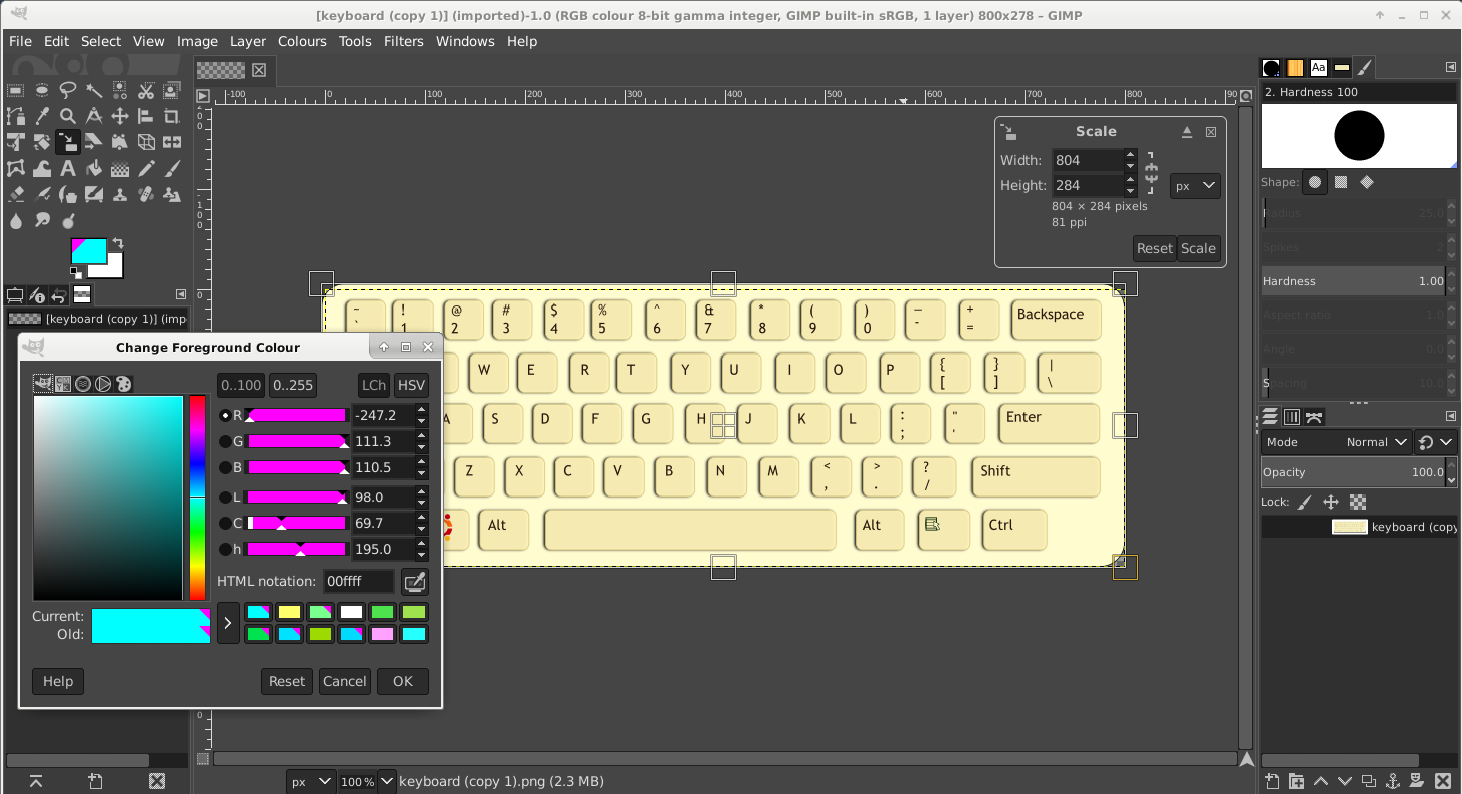
GIMP plus image

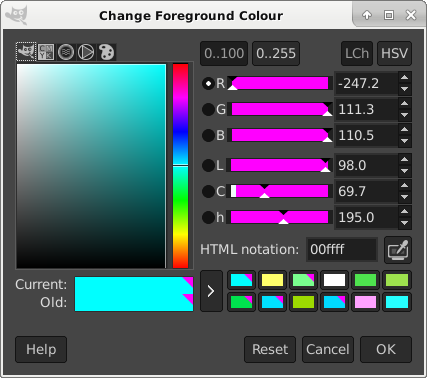
Used the ForeGround Colour tool (also shown above)

Foreground Colour Tool

So in this case, selecting white from the colour history, then clicking on a keyboard key area, you can highlight different keys with a colour.

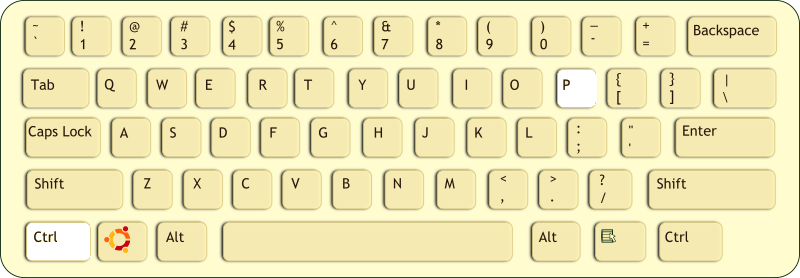
CTRL-P Highlighted

So this shows the modified image.

I also made a video to help illustrate this process.

#gimp,#image,#Colour,#fill,#modification.


Mastodon ShellLabs Join Mastodon
AI statement : Consent is NOT granted to use the content of this blog for the purposes of AI training or similar activity. Consent CANNOT be assumed, it has to be granted.

Donate using Liberapay

Mini Deb Conferences

Updated and reposted 25/11/2020

MiniDebConf : 21+22 Nov 2020 Schedule : Schedule * Recordings from sessions are now on the website – links in schedule * Peer tube link for recordings

IRC : minidebconf-online on oftc please see “HOW TO JOIN VIA IRC” below.

https://mdco2.mini.debconf.org/schedule/

Welcome to MiniDebConf Online #2 "Gaming Edition", four days of Debianites working together to learn, have fun and improve Debian.

Recently, Debian (and Linux in general) has been emerging as a great platform for gaming. Not only for playing games, but for creating games too. 

More information can be found here

HOW TO JOIN VIA IRC

  1. Please review the website and Code of Conduct information.
  2. Goto https://www.oftc.net/
  3. Top right hand corner
  4. Press Chat

form


Mastodon ShellLabs Join Mastodon
AI statement : Consent is NOT granted to use the content of this blog for the purposes of AI training or similar activity. Consent CANNOT be assumed, it has to be granted.

Donate using Liberapay

FSFE NEWSLETTER

Software Freedom 2020

In our Newsletter November, we review our annual report "Software Freedom in Europe" and the new Free Software Strategy by the European Commission. We have new staffers, a new call for FSFE community projects, REUSE is taking off, the local group in Zurich received an award, and so much more has happened to discover

https://fsfe.org/news/nl/nl-202011.html

#FSFE,#NEWSLETTER,#NOVEMBER2020


Mastodon ShellLabs Join Mastodon
AI statement : Consent is NOT granted to use the content of this blog for the purposes of AI training or similar activity. Consent CANNOT be assumed, it has to be granted.

Donate using Liberapay

LibreOffice 7.1 beta

LibreOffice 7.1 Beta1 is available for testing

lo71

LibreOffice 7.1 will be released as final at the beginning of February, 2021 ( Check the Release Plan for more information ) being LibreOffice 7.1 Beta1 the second pre-release since the development of version 7.1 started at the end of May, 2020. Since the previous release, LibreOffice 7.1 Alpha1, 1131 commits have been submitted to the code repository and 245 issues got fixed. Check the release notes to find the new features included in this version of LibreOffice.

See LibreOffice blog for details


Mastodon ShellLabs Join Mastodon
AI statement : Consent is NOT granted to use the content of this blog for the purposes of AI training or similar activity. Consent CANNOT be assumed, it has to be granted.

Donate using Liberapay