In order to submit levels for rocks and diamonds, I needed to archive all the levels together. Under Debian 10 xarchiver, is one tool that can be used for this.
It should be a case of
Goto folder with files in
Select all files you would like to add
right click on one of the selected files and select create archive
I have added a short video below, other than the slight hiccup with selecting the files, this will produce a tar.gz archive file.
AI statement : Consent is NOT granted to use the content of this blog for the purposes of AI training or similar activity. Consent CANNOT be assumed, it has to be granted.
CrypdPad contents
To make it easier to find various posts relating to cryptpad
AI statement : Consent is NOT granted to use the content of this blog for the purposes of AI training or similar activity. Consent CANNOT be assumed, it has to be granted.
The technical writers guide to contributing to open source projects
I found a link to this article on Twitter, posted by Edidiong Asikpo so am sharing here as it may be of interest to some of the projects I am involved in.
AI statement : Consent is NOT granted to use the content of this blog for the purposes of AI training or similar activity. Consent CANNOT be assumed, it has to be granted.
Vokoscreen
Vokoscreen is a small application in Debian that allows users to make video recordings of screen operations. I have been using this to produce videos for the LibreOffice how_to resources for example.
You can install with:
apt install vokoscreen
Upon running, you are presented with the main recording screen.
From here, you can set various options. I am mostly using region as this can be:
resized
record specific areas of the screen or application
Once you have selected the area to record press
the start button to begin then the stop button to stop recording, recordings will be saved in /home/user/Videos.
If you want to record a larger area, then the application can get in the way, in which case, it can be minimised and the short cuts used instead.
CTRL-SHIFT-F10 to start
CTRL-SHIFT-F11 to stop
CTRL-SHFT-F12 to pause
You can also record audio on top of your video
Video settings, allows you to fine tune your video further
The next tab
Allows you to set where recordings will be saved, where the preview application is (I am using vlc here)
Camera
Allows you to set up your usb webcam so you can have video in video. Which may be useful for teaching.
The final tab, as details of the developer team.
This application is really easy to use, and very useful for producing all sorts of mixed media (video + sound).
AI statement : Consent is NOT granted to use the content of this blog for the purposes of AI training or similar activity. Consent CANNOT be assumed, it has to be granted.
Booting into console mode
With most Linux systems you boot in to a Graphical desktop. However, there are times when you want to perhaps use a pure console. While you can switch to a console with CTRL-ALT-Fn keys. If you want to set your system so that it boots directly to the console then I have found the instructions here.
AI statement : Consent is NOT granted to use the content of this blog for the purposes of AI training or similar activity. Consent CANNOT be assumed, it has to be granted.
Emacs Conference 2020
Less than 1 week till EmacsConf 2020
EmacsConf2020 takes place on the weekend of 28th and 29th November 2020. 2pm-10pm UTC,
EmacsConf is the conference about the joy of Emacs, Emacs Lisp, and memorizing key sequences.
Just as with the 2019 There will be talks, workshops and discussions. As you would expect free software is used extensively to put the conference together, this includes several IRC channels as well as video streaming.
Below is a flyer, please feel free to download and share, to help spread the word.
AI statement : Consent is NOT granted to use the content of this blog for the purposes of AI training or similar activity. Consent CANNOT be assumed, it has to be granted.
AI statement : Consent is NOT granted to use the content of this blog for the purposes of AI training or similar activity. Consent CANNOT be assumed, it has to be granted.
Scratch Spiral Project
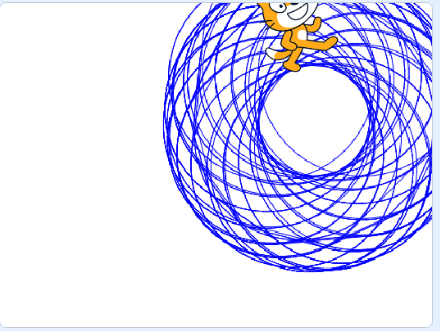
So in this activity, we are going to try and produce a spiral using Scratch code. This is similar to what Spirograph [TM] produces.
It should look something like this when complete.
Open up Scratch 3 in a browser and create a new project.
Start off with the when Green Flag is clicked block
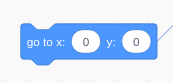
Set the Sprite to the centre of the stage
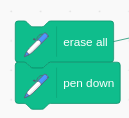
Add a block to erase anything drawn on the stage from previous projects, then put Pen Down.
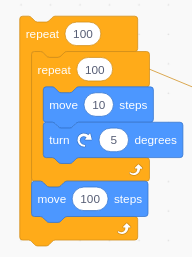
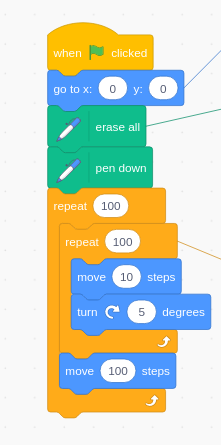
Now add the Main Loop blocks as follows
Your final code should look like this
When run, you should see it draw circles on the screen, move and re-draw, eventually building up a layer on layer spiral pattern with circles.
The method here for drawing circles could be used in other projects too.
AI statement : Consent is NOT granted to use the content of this blog for the purposes of AI training or similar activity. Consent CANNOT be assumed, it has to be granted.
Emacs Jan 2021 Calender
This is a quick video showing how to make a Calender for January 2021
Typo in the filename, which is not important as it just here for illustration.
AI statement : Consent is NOT granted to use the content of this blog for the purposes of AI training or similar activity. Consent CANNOT be assumed, it has to be granted.
LibreOffice Introduction
This video (not by me) is on Youtube. Explains the new features found in LibreOffice 7.
I am putting together, some videos on undertaking basic tasks in LibreOffice Writer. These are on my dedicated LibreOffice blog.
AI statement : Consent is NOT granted to use the content of this blog for the purposes of AI training or similar activity. Consent CANNOT be assumed, it has to be granted.