Exeter vs Racing 92
Heineken Champions Cup
Rugby Fixture
Saturday 17th October 16:45 @ Ashton Gate
Scores
- Exeter — Racing 92 — Full time
- Exeter — Racing 92 — (½ time)
#rugby,#Union,#HeinekenChampionsCup,#Exeter,
#Racing92,#result,#fixture
AI statement :
Consent is NOT granted to use the content of this blog for the purposes of AI training or similar activity. Consent CANNOT be assumed, it has to be granted.

Thunderbird 78
Debian has just updated Thunderbird 78. Enigmail is now depreciated, in place of this is direct support for OpenPGP
I have therefore decided to revoke my previous keys and start fresh with a new one, so that this could be set up properly with the new system.
The new interface for Thunderbird, however looks a lot nicer, cleaner and easier to navigate.
AI statement :
Consent is NOT granted to use the content of this blog for the purposes of AI training or similar activity. Consent CANNOT be assumed, it has to be granted.
International day against DRM
https://www.defectivebydesign.org/dayagainstdrm/2019
AI statement :
Consent is NOT granted to use the content of this blog for the purposes of AI training or similar activity. Consent CANNOT be assumed, it has to be granted.
Exeter Chiefs vs Bath
Rugby Fixture
Saturday 10th October home to Bath kick off 16:10
Scores
- Exeter 35 Bath 6 Full time
- Bath ?? Exeter ? (½ time)
#rugby,#Union,#premiership,#Exeter,#Bath,#result,#fixture
AI statement :
Consent is NOT granted to use the content of this blog for the purposes of AI training or similar activity. Consent CANNOT be assumed, it has to be granted.
Nextcloud desktop
As I have been using Disroot e-mail for some time. I have also been using their cloud service for file storage.
As This uses NextCloud. I have installed the desktop client in order to help keep some files synchronised between my netbook and desktop.
nextcloud-desktop/stable,now 2.5.1-3+deb10u1 amd64 [installed]
  Nextcloud folder synchronization tool
This is working very well. I can sync files to the cloud and download them on another connected device.
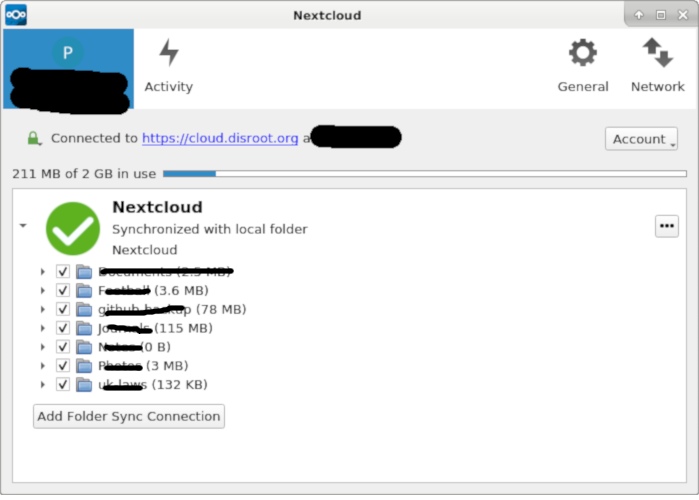
Connecting devices is really easy and is a case of knowing the URL of the service. Then just giving the client the appropriate credentials (as in uid / password).
You get a new folder in /home/user/ which anything copied or moved in to this is sync'd. Remember if you want to keep a copy locally you should copy and paste the file. Otherwise drag & drop will move files.
There is also a green icon in the `panel' which is illustrated below.

As xfce4 allows emblems to be added to files / folders then I have set two, so that this folder is easier to identify. I need to add my 2nd disroot account too, but no rush for that.
Conclusion
If you are looking for a privacy centric alternative for file storage then NextCloud is a great option. Services such as OnlyOffice also integrate in to this to provide a full cloud based office solution.
While you 'can' self host you can also take advantage of many solutions that will take care of this for you.
You can also host in a Docker container.
Version 20 of next cloud also includes Dashboard which has a host of really useful features.
If you live within the UK / EU then you may also want to host within this jurisdiction, in order to help comply with the GDPR.
References
AI statement :
Consent is NOT granted to use the content of this blog for the purposes of AI training or similar activity. Consent CANNOT be assumed, it has to be granted.
Overleaf Webinar 08/10/2020
Overleaf will be presenting their latest webinar, later on today.
Creating the Art of Strategy with Overleaf
Thursday 8 October – 10:00am ET/2:00pm UTC/7:00am PT
This is roughly 15:00 hrs UK time.
For information please check the Overleaf website webinar page
AI statement :
Consent is NOT granted to use the content of this blog for the purposes of AI training or similar activity. Consent CANNOT be assumed, it has to be granted.
ShellCon 2020
ShellCon 2020 takes place 9th – 10th October 2020
ShellCon is an information security conference that is held annually in the beautiful beach cities of Los Angeles. Our conference is a growing event that creates an atmosphere of open communication, collaboration, and connection. We value community, technical knowledge, and getting your hands dirty. Presentations and events at the con will have a focus on practicality and real-world applications. We want you to walk away from ShellCon with an itch to try what you just learned and the knowledge to do so

#conference,#information,#security,#InfoSec,#virtual,#event
AI statement :
Consent is NOT granted to use the content of this blog for the purposes of AI training or similar activity. Consent CANNOT be assumed, it has to be granted.
XFCE Desktop notes
The XFCE desktop is one of the options for a Graphical User Interface that comes with the Debian GNU / Linux operating system.
One of the many tools is a small application that provides the user with the electronic equivalent of sticky notes.
This is a really useful 'always on' application. Great for taking quick notes, saving URLs, passwords (well just delete them afterwards) and other information you may want to just store. You can add new pages as needed.
Technical info
Debian 10 comes with version 1.8.1
If you are wondering where the actual data files are stored, then I had to do some research on this. Turns out from:-
unix.stackexchange.com
The location is
*.local/share/notes/Notes/
Within your home directory.
Install and set up
If not already installed then it can be installed using
apt install xfce4-notes
When you first launch this from the menu, you get the following

Right clicking on the top bar gives access to various configuration / set up options.

There are various options to change the colour.

The application appears as a icon in the top panel.
You can also add to the bottom panel by:

- Right clicking on the panel (try doing this on a spacer)
- Select Panel —> Add new items
- Select Launcher
A new icon will appear on the panel, which you can set up to launch xfce4-notes.

Short video of application in action.
Hosted on Peertube.
References
1 XFCE
* XFCE Twitter
2 Debian
3 Adding items to Panel (video)
4 xfce4 notes video
AI statement :
Consent is NOT granted to use the content of this blog for the purposes of AI training or similar activity. Consent CANNOT be assumed, it has to be granted.
LaTeX project update
The fall 2020 LaTeX release is available

This release introduces a number of important enhancements.
#LaTeX,#project,#update,#fall2020,#release
AI statement :
Consent is NOT granted to use the content of this blog for the purposes of AI training or similar activity. Consent CANNOT be assumed, it has to be granted.
The Nancy Grace Roman Space Telescope
6th October
So following on from Septembers lecture, the Space telescope science institute present their next lecture.
With details here
You can find more upcoming (monthly) lectures below.
http://www.stsci.edu/public-lectures
#video,#astronomy,#space,#science,#stsci
AI statement :
Consent is NOT granted to use the content of this blog for the purposes of AI training or similar activity. Consent CANNOT be assumed, it has to be granted.