Paul Sutton

Personal Blog

Trixie Presentation

I have updated my presentation on Debian to try and reflect the changes in Debian 13 (Trixie).

I have listed the new versions of many packages, based on the information in the Trixie release notes, I have tried to split this list into categories and listed on separate slides.

This is made available via salsa GitLab, so feel free to clone and modify, if you want to contribute, I would suggest forking, so a team can work on it, I am really not that good at git, so struggle a little with pull requests etc.

I have also uploaded to my gopher space.

Hopefully, this will be useful.

Tags

#Debian,#Trixie,#Release,#Presentation


Mastodon ShellLabs Join Mastodon
AI statement : Consent is NOT granted to use the content of this blog for the purposes of AI training or similar activity. Consent CANNOT be assumed, it has to be granted.

Donate using Liberapay

AI enhances Higgs boson’s charm

To me, this is what AI is meant to be used for, taking data and helping scientists sort through this and make meaningful conclusions based on data and interpretation of data.

The CMS collaboration presents a new search for the decay of a Higgs boson into charm quarks, bringing physicists closer to unravelling how this unique particle endows matter with mass [1]

  1. CERN Article
  2. CERN
  3. Wikipedia Higgs Boson

Standard Model

Other links

Tags

#Physics,#CERN,#Higgs,#Boson,#LHC


Mastodon ShellLabs Join Mastodon
AI statement : Consent is NOT granted to use the content of this blog for the purposes of AI training or similar activity. Consent CANNOT be assumed, it has to be granted.

Donate using Liberapay

Satellite re-entry

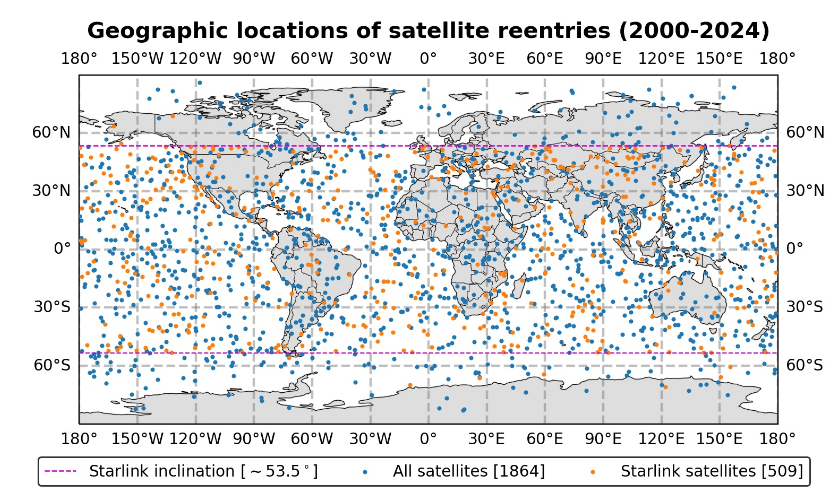
Interesting graphic and paper on the extent of satellite reentry and how satellites are impacted by conditions in space, such as the solar cycles, solar storms etc.

re entry


Mastodon ShellLabs Join Mastodon
AI statement : Consent is NOT granted to use the content of this blog for the purposes of AI training or similar activity. Consent CANNOT be assumed, it has to be granted.

Donate using Liberapay

Pluto Flyby

This is from Astronomy Picture of the Day on the 18th May, New Horizons probe flying over Dwarf Planet Pluto.

Tags

#NewHorizons,#Pluto,#Flyby


Mastodon ShellLabs Join Mastodon
AI statement : Consent is NOT granted to use the content of this blog for the purposes of AI training or similar activity. Consent CANNOT be assumed, it has to be granted.

Donate using Liberapay

ssh – secure shell

Secure shell is a remote login client. The following is from the man page

DESCRIPTION
       ssh (SSH client) is a program for logging into a remote machine and for executing  commands on a remote machine.  It is intended to provide secure encrypted communications between two untrusted hosts over an insecure network.  X11 connections, arbitrary  TCP  ports  and  Unix-domain sockets can also be forwarded over the secure channel.

So as mentioned before, vfsync can't do everything, so if you do need a full Linux system to log in to and install what you want. By this, I am saying you also need to at least have sudo access to that remote system, even if this is a Raspberry Pi.

While being able to log in with

ssh user@host 

Is useful, you still need a password, which is fine. If you want to use some services provided by [vern.cc] then you need to be able to log in with an authentication key. This can be generated with

ssh-keygen
DESCRIPTION
       ssh-keygen generates, manages  and  converts  authentication  keys  for  ssh(1).  ssh-keygen can create keys for use by SSH protocol version 2.

Which will generate a public / private key pair

man ssh-copy-id 

NAME
       ssh-copy-id  —  use locally available keys to authorise logins on a re‐mote machine

DESCRIPTION
       ssh-copy-id  is  a script that uses ssh(1) to log into a remote machine  (presumably using a login password, so password  authentication  should be enabled, unless you've done some clever use of multiple identities).  It  assembles  a  list of one or more fingerprints (as described below) and tries to log in with each key, to see if any of  them  are  already installed (of course, if you are not using ssh-agent(1) this may result  in  you being repeatedly prompted for pass-phrases).  It then assembles a list of those that failed to log in and, using ssh(1), enables logins with those keys on the remote server.  By default it adds the  keys  by appending  them  to  the remote user's ~/.ssh/authorized_keys (creating  the file, and directory, if necessary).  It is also capable of  detecting if the remote system is a NetScreen, and using its ‘set ssh pka-dsa
       key ...’ command instead.

There is some good information here too

The following allowed me to remote login to my Raspberry Pi from my desktop

cd .ssh (I did this so I was in the right place to generate the key)
ssh-keygen
ssh-copy-id -i ~/.ssh/Pi4.pub paul@xxx.xxx.xxx.xxx
ssh paul@xxx.xxx.xxx.xxx

Login with password, and you will be asked for the passphrase the first time you do this. After which, you will be able to just ssh in without the password.

Replace the x's with your IPv4 address.

While using vern, I had to use

ssh-keygen -lf ./key.pub

To address an error, it came up with about keyboard authentication. This worked for me, but should not 'just' be used in every situation.

Graphical ssh

With Linux mint, it is also possible to connect the file manager nemo to a remote server.

File –> Connect to server, then fill in the credentials.

Remote with nemo

With folder, it is probably a good idea to enter the path to your home directory on the remote server, so for a Raspberry Pi with a default username of pi, this is:-

/home/pi

Chat

I am on the Devon and Cornwall Linux user group mailing list and also their matrix channel as zleap, it is better to ask there, that way others can answer too.

Tags

#Bash,#Linux,#ssh,#RemoteAccess,#Security,#SSHKeys,#SecureShell


Mastodon ShellLabs Join Mastodon
AI statement : Consent is NOT granted to use the content of this blog for the purposes of AI training or similar activity. Consent CANNOT be assumed, it has to be granted.

Donate using Liberapay

NASA Pandora

Pandora is a small satellite designed to characterize exoplanet atmospheres and their host stars. It is slated to observe at least 20 different planets during its one year of science operations.

Looks like an interesting mission, which will look for hazes, clouds and water in exoplanets and help search for any indications that life may exist out side of our solar system.

There are some good contenders out there, but nothing concrete has, as yet, been found and there does seem to be quite a few criteria for this.

Discuss

Tags

#NASA,#Pandora,#Exoplanets,#Atmosphere,#Composition,#Mission


Mastodon ShellLabs Join Mastodon
AI statement : Consent is NOT granted to use the content of this blog for the purposes of AI training or similar activity. Consent CANNOT be assumed, it has to be granted.
Donate using Liberapay

Gopher 4: Anatomy of a gopermap

A gophermap is a plain text file, with a specific format to tell gopher how to interpret the various elements.

I will try and explain my own gophermap fille below.

Firstly, we have a banner, this can be gernerated from various websites, for example :-

i ______     _____    _    ____     	(NULL)  0	   
i|__  / |   | ____|  / \  |  _ \    	(NULL)  0	     
i  / /| |   |  _|   / _ \ | |_) |   	(NULL)  0	
i / /_| |___| |___ / ___ \|  __/    	(NULL)  0	
i/____|_____|_____/_/   \_\_|       	(NULL)  0	   

After which I have put a brief introduction and links to text files that are also stored along side the gophermap.

My name is Paul. This is my gopherspace on vern.cc. 

INFO

0About me	about.txt
0Contact	contact.txt
0Blog	blog.txt

So two IMPORTANT things here, the 0 at the start of the line tells gopher to link to a text file. See link 1 for an explanation of what to put at the start of a line for linking to different types of resources.

We then have a name of what we are linking to, then a then the filename. You MUST set up your editor so it interprets tabs properly.

Alongside the text files, I have a PDF file and a link to the source LaTeX file (which is plain text), I have also linked to a shell script and a CSV data file.

PROJECTS

Command reference for the Joe Text Editor

9Joe Command Reference(pdf)	jcr.pdf
0LaTeX Source for above	main.tex

Weather logger,  this is a simple bash script, that uses the ascii weather program to obtain weather information, and log this with time and date.   I have it running on a Raspberry Pi, so when plugged in, it logs the data to a CSV (comma separated values) file. 

0Weather logger bash Script	logweather.sh
0Output file (CSV)	weather.csv

Note, you will probably need to set permissions on logweather.sh to +x

While we can't display pictures / graphics in gopher, we can link to such files so they can be downloaded. Note below, I have these files in a directory / folder alongside my gophermap. so, need to include the path to the file.

  /pictures/tux.jpg

GRAPHICS

ITux	/pictures/tux.jpg
ISouth West Map	/southwest1.png

We can also link to other gopher sites and resources

GOPHER LINKS

0Vern.cc	gopher://vern.cc/	70
0Why is Gopher Still Relevant?	/gopher/relevance.txt	gopher.floodgap.com	70

While it is possible to link to a website URL I have decided to link to a markdown file, that has weblinks within. Users will need to copy / paste the url or download and open as a markdown file.

WEB LINKS

I have sorted into categories

0Astronomy & Space	AstroSpace.md
0Discussion Forums	Discussion.md

Links

1 Structure of a gophermap 2 Vern.cc 3 Vern Matrix

Tags

#Gopher,#Gophermap


Mastodon ShellLabs Join Mastodon
AI statement : Consent is NOT granted to use the content of this blog for the purposes of AI training or similar activity. Consent CANNOT be assumed, it has to be granted.

Donate using Liberapay

Tinkerers Meeting – May 2025

The next meeting of the Tor bay Tinkerers group will be on Saturday 24th May 2025 from 9:30am

We meet at:-

STEAM Cafe & Discovery Centre 13 Torbay Road, Paignton.

Possible topics

To give you an idea of what we have been up to, please see the write-ups on this blog.

If you would like to ask any questions, please message Helen via our Facebook page

Or message Paul via the DCGLUG Matrix Room

Related Links

Tags

#Torbay,#Tinkerers


Mastodon ShellLabs Join Mastodon
AI statement : Consent is NOT granted to use the content of this blog for the purposes of AI training or similar activity. Consent CANNOT be assumed, it has to be granted.

Donate using Liberapay

How to turn Pb in to Au

Physics at CERN have used a high energy pulse to turn Lead (Pb) into Gold (Au).

Interesting experiment.

Tags

#Science,#Physics,#CERN,#ALICE,#Pb,#AU,#TransMutation, #Experiment,#ElectronVolt,#IonizationEnergy


Mastodon ShellLabs Join Mastodon
AI statement : Consent is NOT granted to use the content of this blog for the purposes of AI training or similar activity. Consent CANNOT be assumed, it has to be granted.

Donate using Liberapay

Bash Shortcuts

This question was asked on the Linux Mint Matrix Support recently, I helped by looking up what was needed, and posting this as a reply, As this is also really useful and worth sharing more widely too.

Chat

I am on the Devon and Cornwall Linux user group mailing list and also their matrix channel as zleap, it is better to ask there, that way others can answer too.

Tags

#Bash,#BashScripting,#Bashscripting,#Keyboard,#Shortcuts


Mastodon ShellLabs Join Mastodon
AI statement : Consent is NOT granted to use the content of this blog for the purposes of AI training or similar activity. Consent CANNOT be assumed, it has to be granted.

Donate using Liberapay